

For connected activity inventory and traveler-facing apps, see activities API integration and customer travel mobile applications.
A tours and attractions mobile app should help people choose an experience confidently, reserve the correct date and participants, arrive at the right place, and enter without avoidable confusion. Behind that simple journey, an operator needs accurate schedules, manageable capacity, dependable tickets, and a clear way to resolve exceptions. Good tours and attractions mobile app design connects both sides without forcing either group through screens intended for the other.
Start With the Real Booking and Visit Journey
Attractions are not all booked in the same way. A museum may sell admission for a specified entry window. A walking tour may have a departure time, guide, language, and maximum group size. A boat excursion may require a weather-related operating decision and a check-in deadline. A private activity may depend on a request, quotation, or operator acceptance. A generic calendar followed by a payment button cannot safely express every model.
Map the full journey: inspiration, discovery, comparison, selection, availability, participant details, checkout, confirmation, pre-visit instructions, admission, and after-sales assistance. For each stage, specify what the traveler knows, what the source system knows, and what remains provisional. Design success means the traveler can understand the next action and the operator can identify the same booking state.
Separate Traveler and Operator User Roles
Traveler permissions and priorities
Travelers want to explore available experiences, compare inclusions, select a suitable option, and retrieve their reservation when needed. Guest browsing should usually remain possible without immediate registration. Account creation, if required, belongs at a justified point in the journey. A traveler profile may contain saved preferences, consented contact details, future bookings, and previously issued tickets, with access limited to the account holder or an authorized booking companion.
People booking on behalf of family members need clear distinctions between the purchaser, primary contact, and actual participants. A booking with three attendees should not automatically assume all three need separate accounts. Support accessibility preferences and language choices where the business can operate them; avoid collecting personal data that has no stated booking or service purpose.
Operator, guide, and support permissions
Operators need a role-specific work area for schedules, capacity, bookings, pickup manifests, ticket validation, and exceptional cases. A guide might only need today's assigned departures and attendee check-in status. A reservations agent may need to modify eligible reservations, while a finance administrator may review settlement-related records. Administrative functions should not be exposed simply because the operator interface and traveler interface share an application.
Design Tour Discovery Around Decisions, Not Endless Scrolling
A discovery screen should help the traveler narrow a broad destination into relevant options. Common inputs are location, visit date, interests, activity type, approximate duration, language, accessibility needs, and who is traveling. Filters should match actual product data. Do not display a wheelchair-accessible filter unless the operator can substantiate the classification for each listed experience.
Cards can present the experience title, locality, representative photo if licensed, duration, main inclusion, booking model, and a clearly attributed price when reliable pricing exists. If a date or participant mix changes the total, label any displayed amount appropriately and obtain a current quote before payment. Avoid implying that an undated product card guarantees availability.
Search, map, and category navigation
Search results should tolerate alternate place names and common spelling differences. Categories such as sightseeing, museums, food experiences, outdoor adventures, or family activities can speed exploration, but the taxonomy should reflect the catalog. A map can help visitors compare meeting-point areas; it should not substitute for precise written directions or suggest a route is guaranteed when transport is disrupted.
Build an Experience Detail Page That Answers Practical Questions
The detail page must explain what someone is buying before asking for participant information. Present an honest description, duration, itinerary outline where applicable, inclusions, exclusions, meeting or pickup arrangement, physical requirements, age restrictions, accessibility information, language, operator rules, and cancellation terms. The product source should own this information, with editorial review before publication.
Place critical conditions near the booking controls instead of hiding them in long expandable sections. For example, “arrive before departure,” “bring identification,” and “ticket must be exchanged” are operational requirements, not minor footnotes. If the experience is weather-dependent or subject to operator confirmation, state that clearly without promising a particular outcome.
Show Availability, Dates, and Time Slots Honestly
The calendar is one of the highest-risk parts of a booking flow. The app may show open dates, time slots, remaining capacity, booking cutoffs, and different options for the same experience. Distinguish an unavailable date from one that has not loaded, and distinguish a confirmed time slot from a request that an operator still must approve. If the provider supports only a date-level availability check, do not fabricate departure-level detail.
Availability and reservation state
Ask which system owns inventory: a local reservation platform, attraction ticketing system, or approved distribution integration. Define how frequently the application can refresh its information and when it must revalidate a selection. Browsing a valid slot is not the same as holding inventory. The final checkout flow must respect the source system's reservation, confirmation, expiration, and cancellation rules.
When two travelers select the final place simultaneously, the backend must determine which reservation is accepted. The interface should be prepared for a changed slot or unavailable option, preserve safe selections when possible, and offer a clear alternative. Do not show “booking confirmed” from a successful payment screen alone if the supplier booking state is unresolved.
Time zones and date interpretation
Always identify a departure in the attraction's local time zone. Travelers may browse abroad and arrive after changing device time zones. Store a named venue time zone with the activity configuration, handle daylight-saving changes, and test departures near midnight.
Illustrative workflow: A visitor chooses Tuesday, then an afternoon admission window. The app refreshes the applicable capacity, identifies the selected option, and displays the venue-local time. Before commitment, the system checks the availability again. If the slot closes, it explains the reason in ordinary language and lets the visitor select a different time. This example does not imply a particular provider's API supports every step.
Make Participant Selection and Pickup Information Precise
Participant selection is more than a numeric stepper. A product may distinguish adults, children, infants, students, seniors, private groups, or participants who require additional equipment. The exact categories, age bands, eligibility documents, and price rules must come from the operator or authorized inventory source. The app should explain category boundaries at the moment of selection and prevent combinations that violate product rules.
Meeting points, hotel pickup, and self-arrival
Pickup is often the difference between a smooth tour and a missed departure. Show whether the booking includes hotel pickup, offers pickup for selected locations, requires a meeting point, or expects self-arrival. Do not present an arbitrary hotel search field as a promise that every address is serviced. Where pickup choices depend on an operational zone, validate the selected location and any lead-time requirements.
Once confirmed, show the meeting-point name, street-level description, map link if verified, recommended arrival instructions, contact method, and any operator-specific confirmation condition. For a pickup arrangement, distinguish a pickup window from an exact guaranteed minute. Include the correct local date when late-night pickup could be confused with the activity start date.
Illustrative interface: A participant form allows two adults and one child, then offers “Meet at departure point” and “Request eligible hotel pickup.” When the traveler chooses a pickup location, the app explains that pickup details remain subject to operator confirmation if the source workflow requires it. The wording and options are for design illustration only.
Design Payments and Confirmation as Separate Steps
The checkout screen should summarize the selected experience, date, local start time, ticket categories, pickup choice, applicable charges, and the total that will be submitted for authorization. If taxes, fees, currency conversion, deposits, or mandatory extras apply, the app must communicate them according to the actual merchant arrangement and applicable rules. Never use a sample figure as if it were a live attraction price.
Prefer an appropriately integrated payment service that handles card details within its approved flow. The PCI Security Standards Council's PCI DSS guidance is a useful official reference for scoping payment-account-data protection; a hosted payment component does not eliminate the need to review the full merchant environment and responsibilities. Avoid storing raw card data in app logs, analytics events, or support tickets.
Prevent duplicate orders and misleading success screens
A traveler can lose connectivity after payment authorization but before seeing a result. Build a recoverable transaction record, use safe retry handling, and reconcile payment state separately from supplier booking state. A repeated tap must not silently create duplicate bookings. If confirmation is pending, say so and provide a traceable reference plus a support route rather than inventing a ticket.
Create Tickets That Work at the Actual Venue
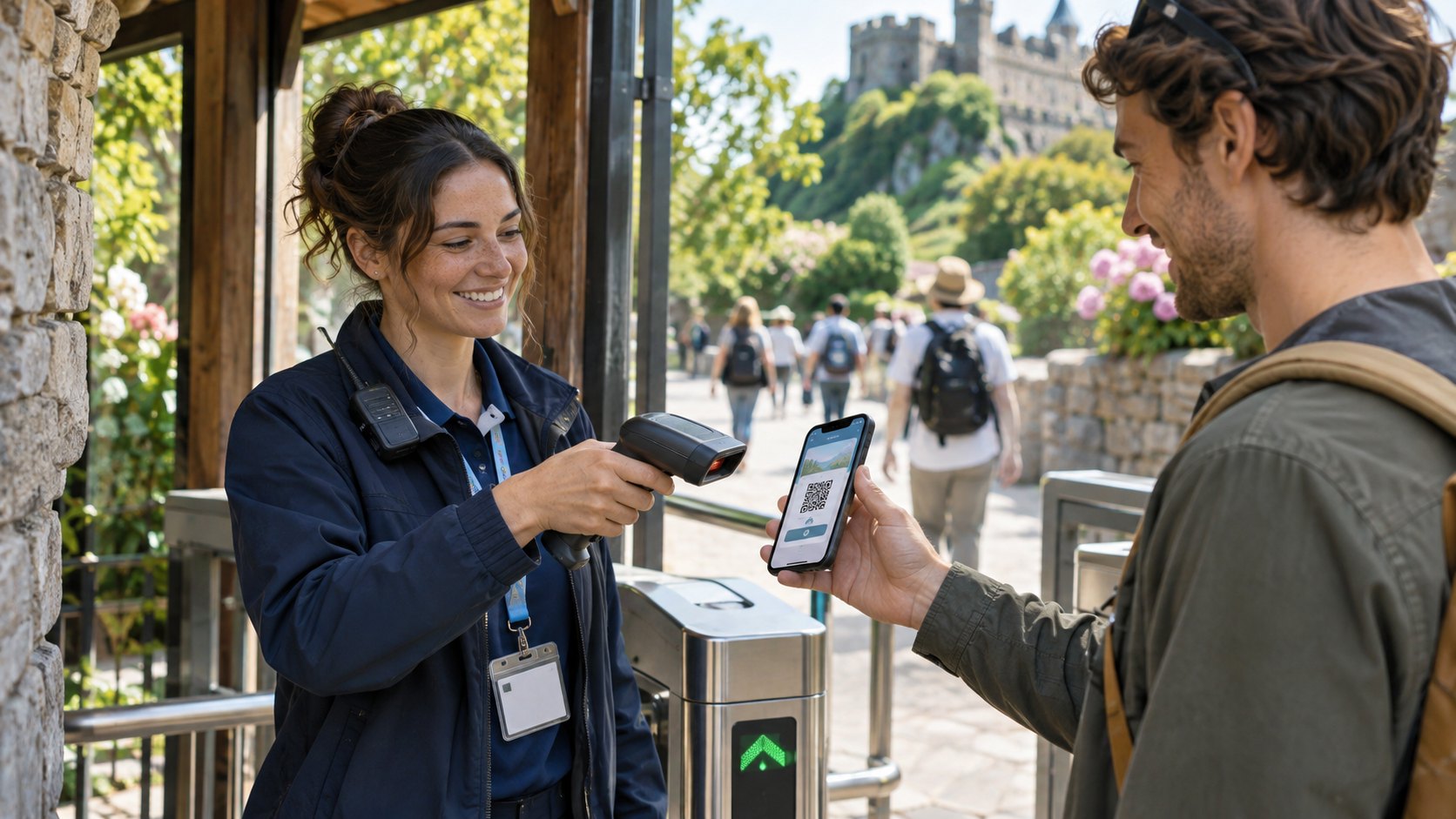
A ticket screen should prioritize the entitlement the venue will accept. That may be a QR code, barcode, booking reference, PDF voucher, or instruction to exchange a voucher for admission. These are not interchangeable. Confirm the operator's scanner format, issuing authority, expiration policy, multi-person redemption rules, and whether a companion must present identification or a separate pass.
Display the experience name, visit date, local time, participant coverage, booking reference, admission instructions, and support contact near the ticket. Where several participants hold distinct admission credentials, make each one individually accessible. If the supplier issues its own ticket document, preserve the required form rather than redesigning the code in a way that invalidates it.
Scanning, redemption, and exceptions
For operator use, a scanner screen needs unambiguous states: valid, already redeemed, canceled, wrong date, unrecognized, or unable to verify. Do not treat every scanning failure as fraudulent behavior. Bright sunlight, damaged screens, offline access, or scanner misconfiguration can also interrupt a legitimate visit. Provide a controlled manual-verification procedure, with permissions and audit records appropriate to the venue.
Plan Offline Access Before Travelers Lose Connectivity
Attractions frequently operate in places with weak reception: crowded entrances, underground venues, rural sites, and foreign destinations with limited roaming. The traveler should be able to reopen essential confirmed details without a reliable connection when the ticket's format and rights allow local storage. That can include the issued document, meeting instructions, visit date, and support numbers.
The official Android offline-first architecture guidance explains the importance of locally available data and deliberate synchronization. For a travel app, define what can be read offline, how long cached records remain valid, and how to indicate when information was last updated. A cached QR code should not be called universally valid offline: some venues require live validation, rotating credentials, or online synchronization.
For staff scanning, decide whether local redemption is permitted at all. If it is, plan secure storage, device assignment, conflict handling, and synchronization after connectivity returns. Two separate offline scanners may otherwise accept the same code. Offline capability is a product-specific contract, not simply a switch in mobile settings.
Give Customers Useful Support Before and After the Visit
Customer support must be reachable from the booking detail screen, not hidden in an unrelated settings page. Context is valuable: an inquiry associated with a booking reference, product option, date, and current status is easier to investigate than an unstructured message. Offer contact channels that the business actually staffs; do not show a permanent live-chat badge if no team can respond there.
Design clear journeys for missing confirmation, wrong participant details, late arrival, pickup uncertainty, cancellations, and rescheduling requests. Make policy eligibility visible before presenting a “Cancel booking” action. Some changes require supplier approval or manual intervention. The app should distinguish “request submitted” from “change completed,” and should never promise an automatic refund where the commercial terms or processing state do not allow it.
Notifications that help rather than interrupt
Useful service messages can cover successful confirmation, changed meeting instructions, required check-in, ticket availability, and operator-approved schedule changes. Provide an in-app record for important messages so a user can retrieve them even after dismissing a notification. Ask separately for optional promotional notifications where required, and offer alternative essential-contact methods when push permission is declined.
Design Operator Tools Around Daily Operations
The operator interface should begin with actionable information: upcoming departures, booked capacity, pickup manifests, participants requiring attention, unissued tickets, and unresolved changes. Avoid a decorative dashboard that makes an urgent missed pickup harder to find. Let staff filter by venue, operating date, guide assignment, product option, and booking status, depending on their permissions.
Capacity controls should distinguish regular inventory updates from exceptional closures. Changing availability may affect multiple channels, so the workflow needs a defined source of truth and an acknowledgment of the downstream impact. A booking list should expose traceable identifiers without displaying unnecessary personal information. Daily manifests should clearly indicate when a record is pending rather than confirmed.
Field staff and administration
Guides may need a compact mobile view for attendee counts, pickup stops, meeting times, and checked-in status. Managers may need a wider console for timetable adjustments, reporting, and permission reviews. Both should use the same authoritative booking states. If staff can edit notes or mark a no-show, define whether those actions affect reimbursement, supplier reconciliation, or customer communication before releasing them.
Illustrative Mobile Screen Blueprint
Use clickable prototypes to validate sequence and terminology before building integrations. The following screens are illustrative interface concepts; they are not live screenshots, existing customer designs, or guarantees of available inventory.
- Explore: destination search, category navigation, selected date, and clearly qualified experience cards.
- Experience: inclusions, restrictions, location, operating model, cancellation terms, and primary booking action.
- Choose visit: product option, calendar, local time slot, participant types, and loading or sold-out states.
- Arrange arrival: meeting point or eligible pickup selection, verified directions, and relevant instructions.
- Review and pay: current booking summary, final amount, relevant policies, and payment-status messaging.
- My bookings: confirmed and pending reservations separated by state, with support and modification options.
- Ticket: issued admission credential, redemption instructions, local visit time, and offline-state label.
- Operator worklist: authorized departures, manifests, check-in actions, and clearly identified exceptions.
Make Accessibility, Language, and Trust Core Requirements
Travelers use mobile screens outdoors, in unfamiliar languages, and while managing bags or children. Design readable layouts, sufficient contrast, comfortably sized touch targets, and a predictable back path. Buttons need descriptive labels, and a calendar must remain usable with assistive technology. Do not communicate availability, errors, or ticket validity by color alone.
Use the W3C Web Content Accessibility Guidelines 2.2 as a practical reference where applicable, alongside the Apple Human Interface Guidelines for platform-specific interaction patterns. Native application accessibility also requires device-level testing with screen readers, larger text, and supported input methods; a web checklist by itself is not sufficient.
International design means more than translating labels. Show destination-local times and understandable date formats; keep currencies and payment totals unambiguous. Support translated operational instructions only where review and maintenance are possible. A stale pickup instruction in a second language can be more harmful than a clearly labeled supported-language limitation.
Specify Integrations, Security, and Ownership Early
Many proposed interfaces depend on systems beyond the mobile app. Define where product descriptions, availability, prices, reservations, customer messages, tickets, and refunds originate. Supplier or marketplace API access may require commercial approval, credentials, technical review, and market eligibility. A published integration page is not evidence of unrestricted access or a live commercial partnership.
Design integration states for success, pending response, rejected booking, timeouts, and conflicting records. Record references that let support and operations reconcile a mobile order with its source reservation. Treat identifiers and personal details carefully in logs and analytics. For mobile-specific risks, the OWASP Mobile Application Security Verification Standard provides official control areas spanning storage, authentication, communication, and privacy.
TravelTech365 describes custom mobile application development services involving architecture and integration planning. Its GetYourGuide integration guidance also illustrates why supplier connections, availability, booking status, and admission require separate verification. These links are background resources, not a claim that a proposed app has a preapproved integration.
Turn Design Decisions Into a Testable Delivery Plan
Begin discovery with a representative product set rather than only the easiest tour. Include a timed attraction, fixed-departure activity, group booking, pickup-enabled product, and an exception-prone case if those models exist in the business. Collect business rules, sample documents, staff procedures, and approved integration specifications. Confirm who can change each rule after launch.
Next, map traveler and operator journeys, create low-fidelity wireframes, and prototype the most consequential screens. Define a reusable design system for navigation, inputs, status labels, error handling, and empty states. The visual design should support the operating model rather than conceal complexity behind animation.
Move into development with acceptance criteria for dates, categories, eligibility, payment outcomes, ticket delivery, offline viewing, and support escalation. Test with genuine approved sandbox data where available, never fabricated production credentials. Validate accessibility on actual devices and rehearse operational incidents: sold-out inventory after selection, changed pickup location, duplicate payment callbacks, and canceled tickets presented at entry.
Practical Tours and Attractions App Design Checklist
Use this checklist at design review and again before release. Each item should have an accountable owner and evidence that it works for the products actually offered.
- Roles: Traveler, guide, operator, support, and administrator permissions are documented and enforced.
- Discovery: Search, filters, descriptions, and availability labels reflect validated catalog data.
- Details: Restrictions, inclusions, exclusions, accessibility information, and policies are visible before checkout.
- Dates: Venue-local time, cutoff rules, sold-out states, and revalidation are tested.
- Participants: Categories, age bands, group limits, and required fields match product rules.
- Arrival: Pickup eligibility, meeting-point instructions, and contact methods are explicit.
- Payment: Final totals, ambiguous outcomes, safe retries, and booking reconciliation are covered.
- Tickets: Issued credentials, admission rules, cancellation states, and scanner behavior are verified.
- Offline: Downloaded information, freshness indicators, and online-only limitations are explained.
- Support: Change requests, refunds, disruptions, and escalations show truthful status messages.
- Quality: Accessibility, localization, privacy, security, and device testing have release criteria.
Frequently Asked Questions
What is different about tours and attractions mobile app design?
Its user experience must account for specific admission or departure rules, participant eligibility, local operating times, pickup arrangements, and tickets. A conventional shopping cart is not enough when inventory can expire, meeting points can change, and the visitor needs a usable credential at a physical venue. The operator's scheduling and support processes matter just as much as the traveler-facing screens.
Should travelers and tour operators use the same app?
They may share a technical platform without sharing the same screens or permissions. A separate staff application can suit guide check-ins and field operations, while a web console may suit complex administration. Decide using task frequency, device conditions, security needs, and support capacity. Whatever the interface choice, enforce permissions in backend services.
How should an app handle live tour availability?
First identify the system that owns capacity and the functions it actually exposes. Show only available data supported by that system, refresh or revalidate at important decision points, and distinguish availability from an accepted reservation. Handle sold-out slots, expired holds, connection errors, and pending confirmations without presenting them as successful bookings.
Can attraction tickets be used without internet access?
Sometimes. A previously issued ticket or voucher may be viewable offline if its format and issuing rules permit storage. Entry still depends on the venue's verification requirements. Some scanners, dynamic codes, and redemption processes require live connectivity. Product teams should state those limitations plainly and test them at the venue.
What should happen when payment succeeds but ticket issuance fails?
The app should show an accurate pending or exception status, preserve the traceable transaction reference, and provide a support path. The backend should reconcile payment authorization with the source booking and ticket response before retrying safely or initiating an authorized resolution. It must not generate an unverified admission code to make the interface look complete.
What should be included in a project brief for TravelTech365?
Describe the target traveler groups, operating regions, product types, inventory owners, current reservation systems, payment arrangements, ticket formats, pickup workflow, staff roles, languages, and required support processes. Provide any approved API documentation and sample booking cases. TravelTech365 can use that information to discuss a custom design and development scope; functionality, integrations, delivery responsibilities, and commercial terms require project-specific agreement.
Discuss a Tours and Attractions Mobile App Project
Effective design makes the traveler's choices understandable and the operator's responsibilities manageable. It brings discovery, inventory, participant rules, arrival information, payment, admission, and support into one coherent journey without hiding uncertainty. The right interface depends on the activities being sold and the systems authorized to fulfill them.
If you are planning a new tours and attractions app or improving an existing booking experience, share your product models, current workflows, and technical constraints with TravelTech365. The next step is a requirements review that identifies realistic interfaces, dependencies, acceptance criteria, and a phased implementation approach—not an assumption that every supplier function is already available.