
Travel CRM Software for Travel Agencies & Tour Operators
Bring customer profiles, enquiries, quotations and booking records into a connected workflow. Build your travel CRM around how your agency sells trips, hands bookings to operations and supports returning customers—with clear ownership and a practical next step.
Organize Customer Information Around Each Trip
Start with your daily sales and service priorities. The workflows below describe configuration and development options. Included features are confirmed during discovery; extended functions and integrations form part of an agreed custom development scope.
Centralized Customer Profiles
Build customer records around contact details, travel preferences, past enquiries and communication history. Keep calls, messages and internal notes connected to the relevant trip so authorized colleagues can continue a conversation without asking customers to repeat everything.
Quotations, Itineraries and Booking Records
Keep quotations and day-by-day itineraries together, with inclusions, exclusions, pricing, validity and identifiable revisions. Plan linked records for flight references and ticket status, hotel stays, car pickup details and package components. Associate confirmations, travel documents and vouchers with the correct booking.
Roles, Follow-Ups and Reporting
Define access for sales, operations, support and management. Agree task owners, deadlines and reminder rules, alongside reports covering open leads, quotation progress, overdue follow-ups and bookings. Specify how revenue, costs and margins should be calculated before relying on financial summaries.
Communication and Sales Automation
Scope email and messaging connections around the channels your team is authorized to use. Associate messages with the relevant lead, define templates and customer communication permissions, and agree which acknowledgements, reminders and task assignments may run automatically. Track opportunity stages and sales activity without losing the booking context.
A closer look at 365TravelCRM
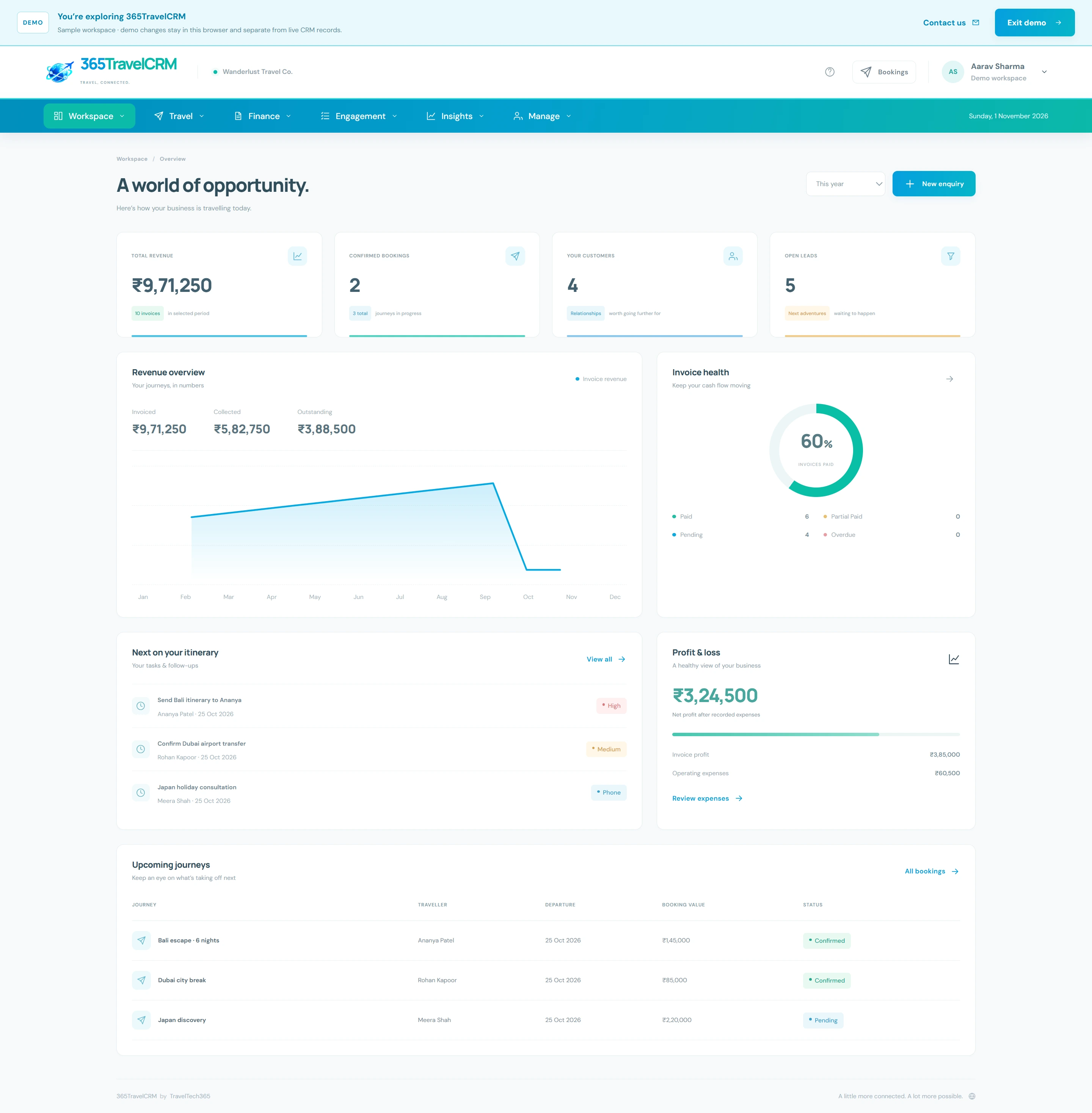
Tell us about your current systems, business priorities and project requirements.
Discuss Your CRM Requirements ↗Eight Stages, From New Enquiry to Repeat Sales
New Enquiry → Assignment → Requirements → Quotation → Follow-Up → Booking → Support → Repeat Sales
- New Enquiry
Record the request, contact details and enquiry source. Link returning travellers to their existing profiles rather than creating duplicate customer records.
- Assignment
Allocate an owner and response deadline. Define reassignment rules for absences, workload or destination expertise so responsibility stays clear.
- Requirements
Capture destinations, dates, traveller numbers, budget and service preferences. Confirm missing details before your team prepares travel options.
- Quotation
Present the itinerary and price breakdown, including exclusions and expiry dates. Keep revisions identifiable so everyone knows which proposal is current.
- Follow-Up
Set the next contact date and record responses, outstanding questions and reasons for delay. Give each active sales opportunity a next action.
- Booking
Link the accepted proposal to reservation references and supplier confirmations. Track customer acceptance, reservation confirmation, ticket issuance and payment as separate statuses.
- Support
Associate amendments, document requests and service issues with the booking history. Assign responsibility, record progress and preserve the resolution for future reference.
- Repeat Sales
Use previous trip preferences and communication permissions to plan relevant future conversations. Record customer feedback and potential next-trip interests.
Tell us about your current systems, business priorities and project requirements.
Discuss Your CRM Requirements ↗General CRM vs Travel-Focused Configuration
The distinction is how customer information and workflows are configured—not a claim that general CRM products cannot support travel. Either approach may require customization.
| Area | General CRM configuration | Travel-focused configuration |
|---|---|---|
| Customer data | Contacts, companies and account notes | Traveller profiles, trip preferences and enquiry history |
| Sales pipeline | Opportunities, values and sales stages | Travel requirements, quotation revisions and departure context |
| Proposals | Product or service line items | Itineraries and flight, hotel, car or package components |
| After-sales records | Tasks, cases and attachments | Reservation references, vouchers and trip amendments |
| Supplier references | Linked account or external record fields | Airline, accommodation and package-component references |
| Team handovers | Account and opportunity ownership | Sales, reservations and operations ownership by trip stage |
| Reporting | Sales and activity summaries | Departure context, quotation conversion and agreed booking/margin measures |
These are illustrative configuration patterns, not a feature comparison of individual suppliers.
Implementation, Integrations and Security
Discovery establishes migration needs, duplicate-record handling, required fields, staff permissions and a pilot workflow. Agree hosting, encryption requirements, backups, activity logging and document retention. Collect sensitive traveller information only where necessary, with access appropriate to each role.
Connections to B2B travel agency platforms, flight reservation systems and dynamic packaging are scoped individually. Discuss travel ERP where finance and operational processes need to connect.
Integration discovery covers API permissions, third-party approvals, data mapping, synchronization rules and error handling. Confirm which system owns each record and how staff will handle incomplete or conflicting updates.
Travel CRM FAQs
What is travel CRM software?
Travel CRM software organizes customer relationships, enquiries and sales activity around travel requirements, quotations and booking context. Its purpose is customer and workflow management, rather than replacing a reservation engine.
What benefits can a travel agency expect?
The aim is clearer ownership, accessible customer history and more consistent follow-ups. Results depend on the agreed configuration, data quality and how consistently teams use the system.
Can it manage both enquiries and bookings?
The proposed workflow connects enquiry and quotation records to booking references and support activity. Live reservation actions require separately agreed booking-system functionality or integrations.
Can it integrate with our existing systems?
Integration can be assessed during discovery. Feasibility depends on API availability, access permissions and required data flows. Specific connections and automatic synchronization are not assumed to be included.
Is it suitable for tour operators?
Tour operators can scope workflows around tailor-made itineraries, group enquiries and supplier coordination. Departure management, passenger lists and other specialist functions require explicit agreement.
Can the CRM be customized?
Discuss your fields, pipeline stages, user roles, quotation formats and reporting requirements. Configuration options, extended custom development, testing and acceptance criteria are agreed before implementation.
Discuss Your CRM Requirements
Tell TravelTech365 how enquiries arrive, who handles them and where booking handovers become difficult. Define a CRM scope around your current process, your existing systems and the improvements your team needs most.
Tell us about your current systems, business priorities and project requirements.
Discuss Your CRM Requirements ↗